The Complete Guide to CD and DVD Label Printing: Tools, Templates & Expert Tips
The Complete Guide to CD/DVD/Vinyl Label Printing: Tools, Templates & Expert Tips
Whether you’re a musician, filmmaker, business owner, or hobbyist, how your CDs and DVDs look matters just as much as the content on them. Professional-looking disc and vinyl labels and covers can add credibility, reinforce branding, and help keep your media organised as emphasised in a survey on the Steve Hoffman forum, where 34% of people would opt for the nicer label in there purchasing decision. [stevehoffman] In this guide, with GD Prints 40+ years of we’ll walk through everything you need to know about CD and DVD label printing—tools, techniques, templates, and top expert tips.
What Is CD/DVD and Vinyl Label Printing?
CD, DVD and Vinyl label printing refers to the process of applying a custom design or identifier onto the surface of a disc or its cover. This might include album artwork, branding, track listings, or simple categorisation. There are many different sizes of these depending on which medium you work on and what the desired effect is.
| There are small style stickers applicable to vinyls designed around the spindle hole, aimed at taking up around 1/5 of the record. Some people prefer larger labels to display more graphics, around 3/5 of the vinyl record. For CD's, the label usually takes up most of the CD, with a larger gap in the middle. This gap is about 38mm (3.8cm) and accommodates for the CD spindle hole and extra space that it needs. DVD's are usually the same but can occasionally go closer to the spindle hole. CD & DVD stickers that cover more of the disc are available if you prefer the graphic to cover more of the disc. With modern disc drives the stickers should not affect the performance, but if you use older technology the standard size for CD'd are ideal. | 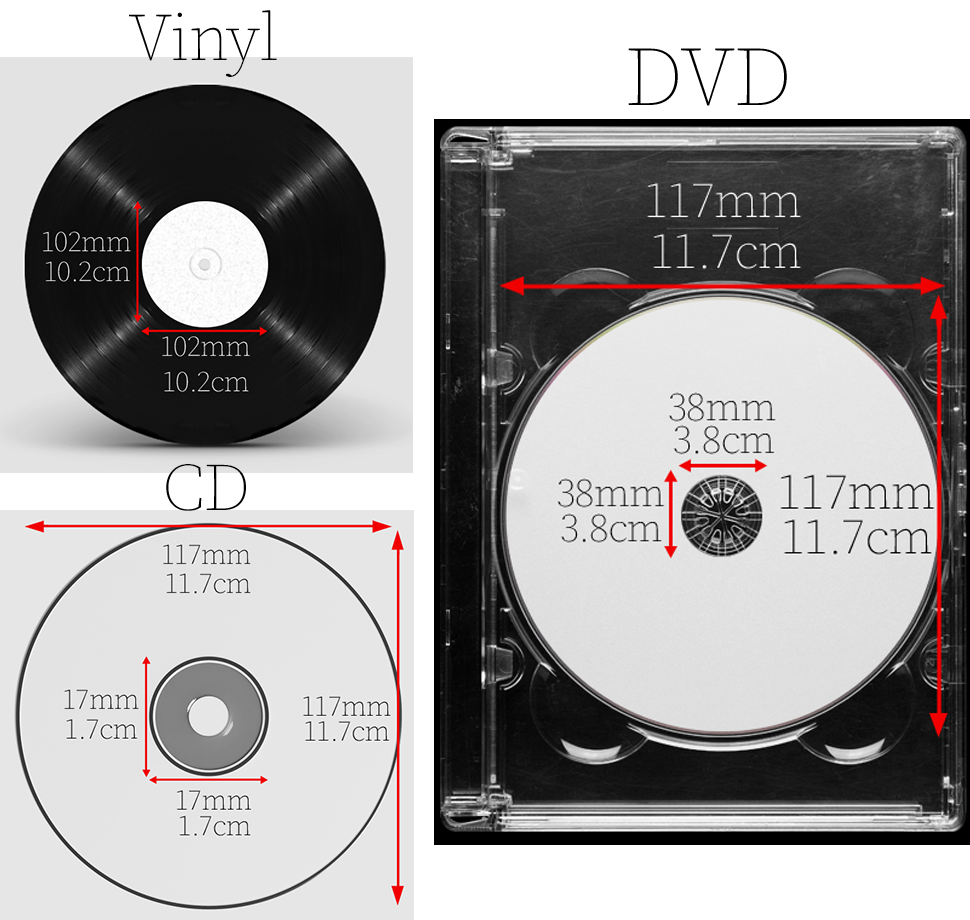 |
There are multiple ways to create these labels, ranging from using a dedicated CD label printer or CD printer to manually printing CD label templates with adhesive printable CD labels. GD Print provides CD, DVD and Vinyl label printing of all listed sizing and additional large sizing if required, Discover yours here.
Why Custom CD Printing Still Matters in 2025
While digital has taken centre stage, many industries still rely on custom CD printing and DVD printing. Here’s why:
• Professional presentation: Branded CD covers and DVD labels are essential for musicians, filmmakers, and corporate training.
• Archival use: Libraries, schools, and photographers still use CD/DVD labels for backup, cataloguing, and distribution.
• Brand consistency: Businesses using CD and label maker tools can maintain branding across physical media.
• Gift & keepsakes: Home video DVDs and photo CDs make perfect mementoes with a custom CD label design.
For a deeper dive on this topic, discover our article here and learn how CD and DVD labels are more popular than ever in 2025.
Label Options: Printable, Adhesive & Direct-to-Disc
Depending on your equipment and budget, you can choose from a few core methods of CD/DVD label printing:
• Printable CD Labels: Adhesive labels designed to be printed using standard printers. Perfect if you don’t have a dedicated CD label printer.
• Direct-to-Disc CD Printing: Uses inkjet or thermal printers to apply designs directly onto discs.
• Custom CD/DVD Printing Services: Professional CD cover printing companies offer bulk solutions with higher print quality.
At GD Print we provide printable CD/DVD and Vinyl labels, all with high quality vinyl that lasts. Check them out here.
Recommended Tools: Label Makers, Printers & Software
To get started with your own CD/DVD label printing, here’s what you might need.
CD Label Printer (e.g. Epson Discproducer).
Machines specifically designed for direct-to-disc printing
Advantages:
1. Designed specifically for printing directly onto discs
2. Produces professional, smudge-resistant results.
3. Ideal for bulk CD/DVD printing projects, small businesses, ect.
Disadvantages:
1. Higher upfront cost than basic printers.
2. Limited to disc printing—won’t help with case inserts or booklets.
3. Requires compatible printable discs.
CD Label Maker Software
Programs like Adobe Illustrator for full control over layouts.
Advantages:
1. Offers precise control over label layout and design.
2. User-friendly options available.
3. Supports branding, custom artwork, and text formatting.
Disadvantages:
1. Some programs may require a learning curve or design experience.
2. Paid versions can be expensive depending on the features.
3. May require manual alignment with templates if not using direct-to-disc printing
CD Label Template
These pre-sized templates help you design with perfect alignment. Most DVD label creators come with downloadable options.
Advantages:
1. Ensures accurate alignment and sizing for professional results.
2. Compatible with many popular software tools.
3. Saves time during layout and design stages.
Disadvantages:
1. Requires careful printing setup to avoid misalignment.
2. Not all templates are compatible with every printer.
3. Limited design flexibility if sticking to basic template formats.
Hybrid CD and Label Maker System
Advantages:
1. Handles multiple tasks—disc labels, jewel case inserts, DVD covers, etc.
2. Convenient all-in-one solution for media packaging.
3. Ideal for artists, marketers, and small businesses needing complete disc presentation.
Disadvantages:
1. May cost more than buying individual tools.
2. Bulkier and potentially more complex to operate.
3. Might not match the high-quality output of specialised equipment for each task.
How to Use a CD Label Maker Step by Step
1. Choose your CD label template or software.
2. Design your label—include text, images, and branding.
3. Select whether you’ll use printable CD labels or print directly to disc.
4. Align your print using test sheets.
5. Print using your standard printer or a dedicated CD label printer.
6. Apply carefully—misalignment can affect how the disc plays. (Learn how to apply it without bubbles or misalignment here!)
Want some more information on how you can create vinyl stickers at home? View our article here!
Frequently Asked Questions
Q: Can I use regular paper for CD/DVD labels?
No—use only CD disc labels or dedicated printable labels. Regular paper won’t align or stick properly and may damage your disc drive.
Q: What’s the difference between a CD label printer and a regular printer?
A CD label printer is specifically built for direct disc printing, offering higher precision and better disc-safe ink compatibility.
Q: Is there a difference between DVD labels and CD labels?
Functionally, they’re similar—but DVD label templates may include options for wider jewel case artwork or longer content descriptions.
Q: How do I remove existing sticker residue?
Use a gentle adhesive remover like rubbing alcohol, white vinegar, or a commercial product (e.g. Goo Gone). Apply it with a cloth, let it sit briefly, then wipe clean. For stubborn residue, use a plastic scraper. For a more expansive look on the topic, discover our article here!
Q: How do I avoid sticker residue in the future?
Choose stickers with removable adhesive or low-tack vinyl such as GD Print's Residue Free Vinyl Sticker. Always apply to clean, dry surfaces and avoid excessive heat or sun exposure, which can cause adhesives to bond more strongly over time.
Our Most Popular Offerings Based on 40+ Years of CD Printing Experience
At GD Print, we’ve been printing and labelling CDs and DVDs for over four decades—and we’ve seen how customer needs have evolved. Today, the most requested options reflect a balance of quality, practicality, and standout presentation. Here are some of our most popular offerings:
• Matte CD Labels with Full Colour Print
Ideal for musicians, small businesses, and software distribution. Matte finishes help reduce glare and offer a professional, understated look.
• Glossy Printable CD Labels
Popular among creators and marketers wanting vibrant visuals. These labels work well with high-resolution logos and photography.
• CD Cover Printing & Inserts
Custom printed CD covers and jewel case inserts remain essential for musicians, filmmakers, and branded company media kits. We offer both single and multi-panel formats.
• DVD Label Printing with Matching Templates
Especially in demand for weddings, corporate training videos, and educational series. Matching label + disc artwork ensures a polished, cohesive look.
Whether you need CD label printing, DVD disc artwork, or full custom CD printing, our in-house team can guide you from template to final product. We’re here to make your discs look sharp, professional, and ready to impress. Discover our options here.
Professional CD and DVD Label Printing in the UK
At GD Print, we offer high-quality CD printing, DVD label printing, and complete disc packaging solutions. Whether you need short runs or bulk orders, we’ll ensure your custom discs are printed to perfection—with eco-friendly practices and expert support.
Let’s bring your media to life—contact us today for a quote or explore our range of custom CD/DVD printing services.
Bringing 40+ years of print expertise to businesses across the UK. GD Print specialises in high-quality, eco-friendly printing for every occasion. Proudly trusted by businesses in Southampton, Bournemouth, and across the South Coast.

